
User Manual
Muse & Legend
MALANG Massage Chair · Model ML-FV8-25V1
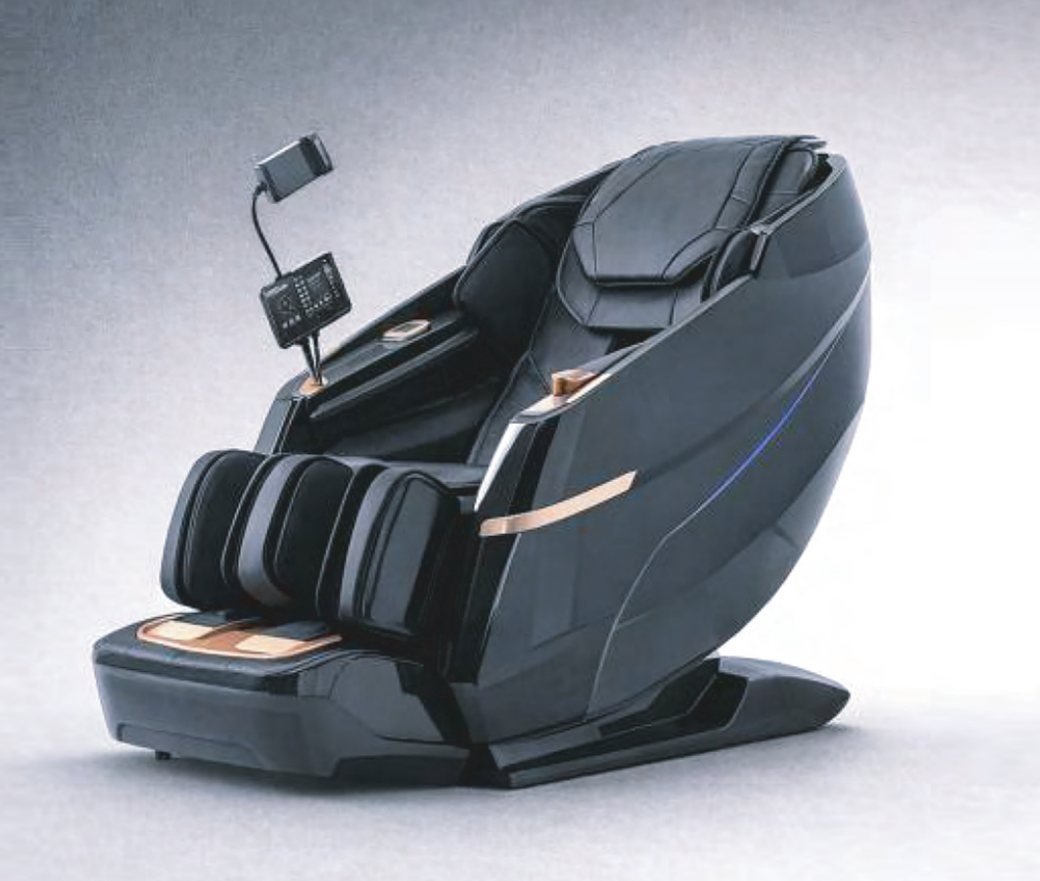
Welcome to refined comfort. This massage chair is precisely engineered to support the natural movement and balance of the body. Each contour, motion, and function is designed to deliver a seamless full-body experience—quiet, fluid, and deeply restorative.
No results. Try a different word.
01Product Features
Elegant Design & Sustainable Craftsmanship
The chair is defined by refined lines, sophisticated finishes, and an intuitive interface. Thoughtfully crafted using environmentally responsible materials, it reflects a balance of modern design and conscious engineering.
Dual Massage System with Eight Intelligent Massage Heads
Equipped with two independent massage mechanisms and eight precision massage heads, the chair delivers expert kneading and tapping techniques across the neck, back, waist, and hip areas, promoting balanced support and deep muscular relief.
Comprehensive Air Massage System
Approximately twenty airbags gently envelop the legs, arms, and shoulders, providing a smooth, rhythmic air-pressure massage that stimulates circulation and eases accumulated tension.
Customizable Massage Techniques
Massage functions for the neck, back, waist, and hip areas may be individually adjusted. A selection of multiple massage programs and five intensity levels allows for a personalized experience tailored to individual preference.
Precision Intensity & Airbag Control
One-touch controls enable independent activation of air massage functions, with fine adjustment of shoulder, arm, and leg intensity across six levels to achieve optimal balance and comfort.
Ergonomic Zero-Gravity Decline
The backrest reclines between 115° and 155°, positioning the body in a near weightless “zero-gravity” posture that reduces spinal pressure and enhances overall relaxation.
Soothing Heat Therapy
Gentle heat is delivered to the waist and leg areas, maintaining a consistent temperature range of 35°C – 45°C to relieve muscle stiffness and support healthy blood circulation.
Adjustable Massage Duration
Massage sessions may be set in five-minute increments, ranging from a brief five-minute refresh to an extended thirty-minute relaxation session.
SL-Type Extended Guide Rail
An ergonomically designed SL-type guide rail supports a smooth, continuous massage path from the neck through the lower body, following the natural curve of the spine.
Immersive Hi-Fi Bluetooth® Audio
Integrated high-fidelity speakers deliver clear, enveloping sound, enhancing relaxation and creating a refined, immersive sensory environment.
02Component Names
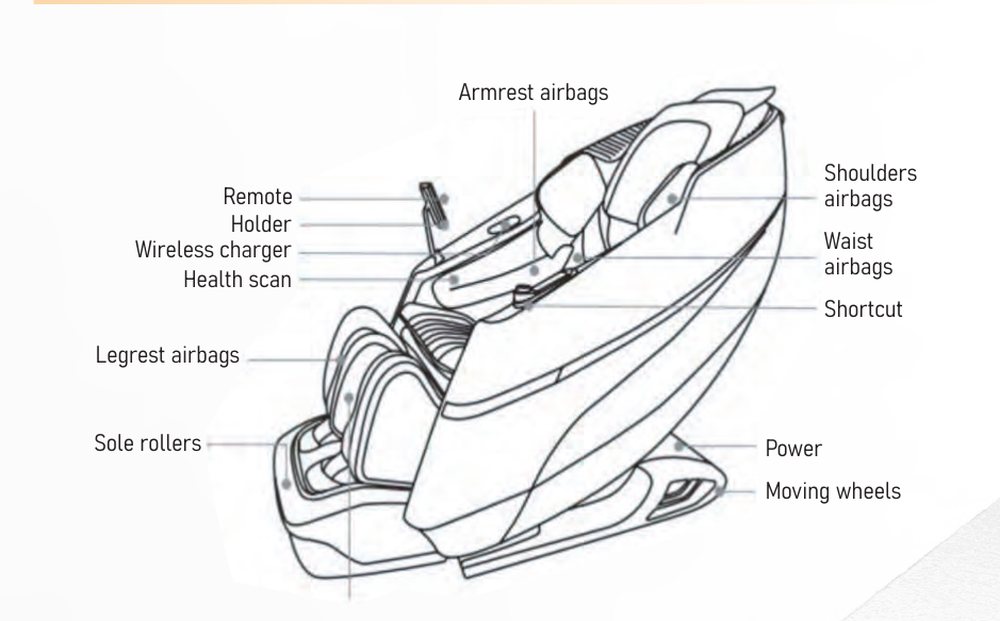
The advanced SL-track allows the dual massage mechanisms to follow the body’s natural curvature, delivering synchronized, full-length coverage from the neck through the thighs for a continuous and balanced massage experience.
| Location | Component |
|---|---|
| Upper body | Shoulder airbags, armrest airbags, waist airbags |
| Lower body | Legrest airbags, sole rollers |
| Controls | Remote holder, shortcut panel, power switch |
| Convenience | Wireless charger, health-scan sensor, moving wheels |
03How to Use
3.1 Installing the Power Cord
- Locate the power inletFind the power inlet on the rear of the massage chair.
- Insert the plugFirmly insert the power cord plug into the power inlet.
- Connect to the outletConnect the opposite end of the power cord to a standard electrical outlet.
3.2 Moving the Massage Chair
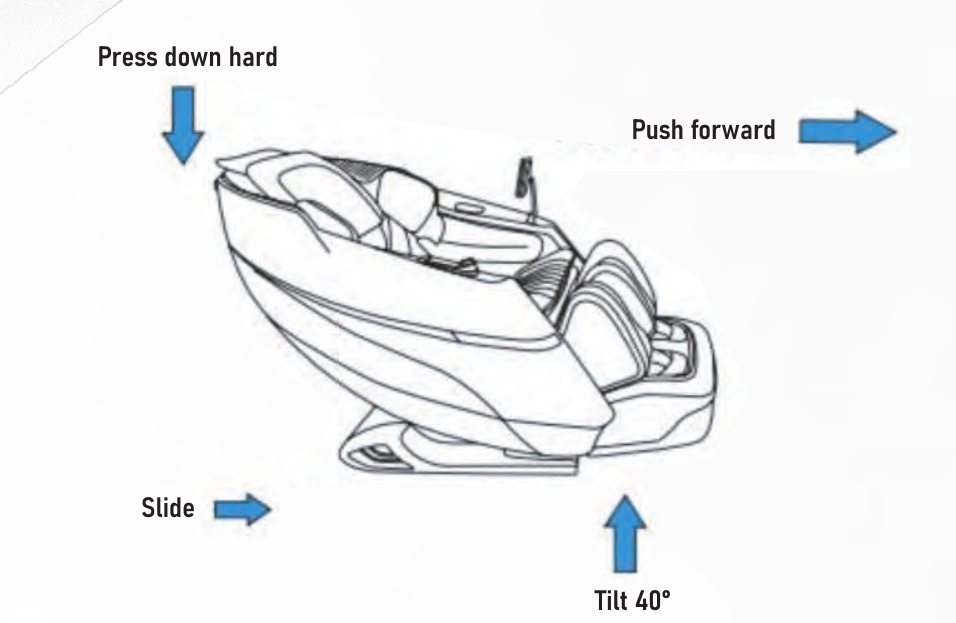
- Empty and power offEnsure the chair is unoccupied and powered off.
- Press the backrestStand behind the chair and press down firmly on the backrest.
- Tilt about 40°Tilt the chair forward until it rests securely on the moving wheels (approximately 40°).
- Push forwardCarefully push the chair forward to its new position.
- Do not apply excessive force when tilting the chair, as this may cause instability.
- Never move the chair while it is occupied.
- To protect flooring, place a mat or protective padding beneath the chair, particularly during relocation.
▶Video Guides
Short videos covering installation and basic operation. Scanning the QR code on the manual cover brings you straight to this page.
Point the QR code on the printed cover and the carton at the short address below. Customers who mislay the paper manual land directly on the current manual and video guides.
malangmassagechair.com/fv8
A short address keeps the QR pattern simple, which scans far more reliably off print. In WordPress, add a 301 redirect from /fv8 to the manual page.
04Tablet Interface
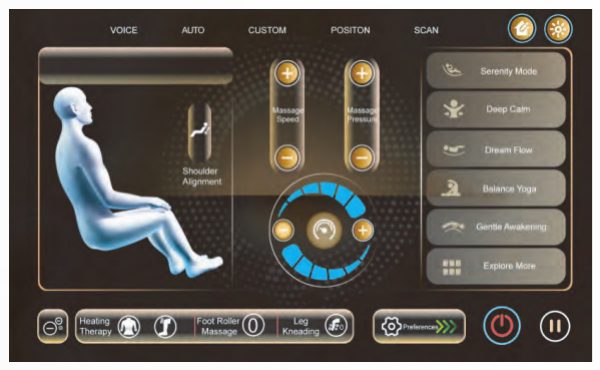
The tablet interface provides intuitive control over all massage functions. Its streamlined layout allows effortless customization while maintaining a calm and immersive user experience.
4.1 Body Scanning
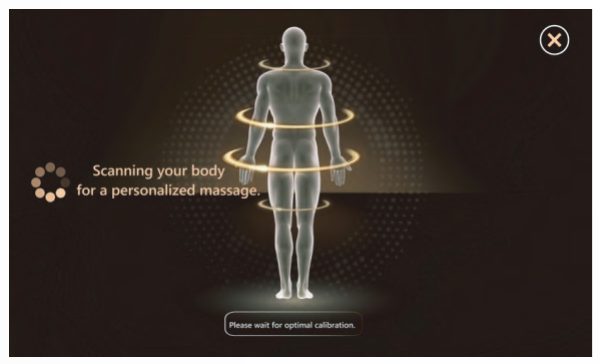
The chair automatically scans the body to detect key pressure points and alignment, allowing the massage system to adapt precisely to individual body contours for a personalized session.
Heating Therapy
Activate or deactivate heat therapy for the waist and leg areas to enhance muscle relaxation and circulation.
Foot Roller Massage
Adjust the intensity of the foot rollers to suit personal comfort and preference.
Leg Kneading
Select and customize leg kneading modes to deliver targeted, rhythmic lower-body relief.
4.2 Automatic Massage Programs
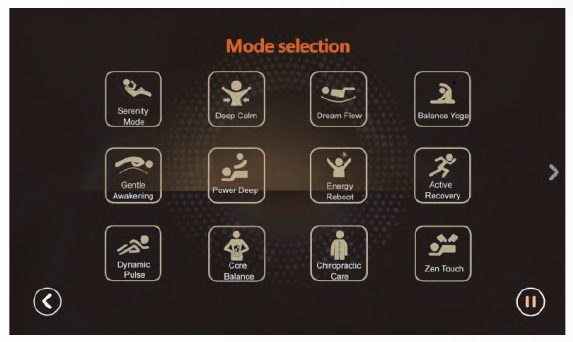
Indulge in a curated collection of expertly designed automatic massage programs. Each mode is thoughtfully crafted to support balance, recovery, and deep relaxation—allowing body and mind to return to harmony with a single touch.
| Program | Purpose |
|---|---|
| Serenity Mode | Immerse yourself in pure tranquility |
| Deep Calm | Deep, settling calm |
| Dream Flow | Drift effortlessly into deep rest |
| Upper Relief | Precise relief for the upper body |
| Chiropractic Care | Rejuvenating spinal alignment |
| Gentle Awakening (Stretching) | Full-body stretching to awaken and extend the body |
| Active Recovery | Revitalize fatigued muscles |
| Balance Yoga | Reconnect the body’s natural rhythm |
| Tuina Therapy | Traditional healing technique |
| Air Embrace | Soft embrace of air pressure |
| Focus Relax | Everyday comfort and unwinding |
| Easy Watching | Soothing ease for your favorite moments of rest |
| Power Deep · Energy Reboot · Dynamic Pulse · Core Balance · Zen Touch | Additional programs (availability varies by model) |
4.3 Manual Mode
Manual Mode provides precise, hands-on control, allowing you to tailor each massage to your individual preferences.
Massage Techniques (six)
- Kneading
- Rhythmic Tapping
- Kneading & Tapping
- Percussion
- Zen Shiatsu
- Bi-Directional Kneading
Massage Position
- Focus Massage — concentrates massage action on a single targeted area.
- Partial Relax — targets a specific region between the upper and lower back.
Advanced Adjustments
- Upper & Lower Body — control the upper and lower massage mechanisms independently.
- Massage Width — select Wide, Middle or Narrow paths (available for flapping and tapping techniques).
- Mechanism Speed — adjust the operating speed of both mechanisms.
- Air Intensity — control the intensity of air compression during the session.
4.4 Health Scan
The Health Scan feature provides general wellness indicators by measuring heart rate, blood oxygen level, and microcirculation.
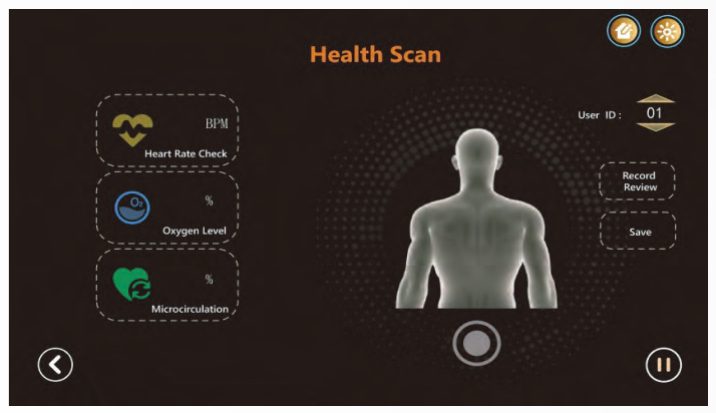
- Open Health ScanAccess the Health Scan interface from the tablet control.
- Place your fingertipPlace your fingertip gently on the designated glass sensor.
- Stay stillEnsure full contact and remain still to avoid interference during measurement.
- Start collectionSelect Start Collection and wait briefly while the scan completes.
- Read the resultsHeart rate (BPM), blood oxygen level and microcirculation results appear on the screen.
4.5 Adjusting Sitting Position
- Backrest Adjustment — press and hold to raise or recline the backrest.
- Leg Rest Extension — press and hold to extend or retract the leg rest to suit your height.
- Leg Rest Lift — press and hold to raise or lower the entire leg rest.
- Zero-Gravity Positions — select from three levels (G1, G2, G3) to reduce spinal pressure.
4.6 Smart Voice Control
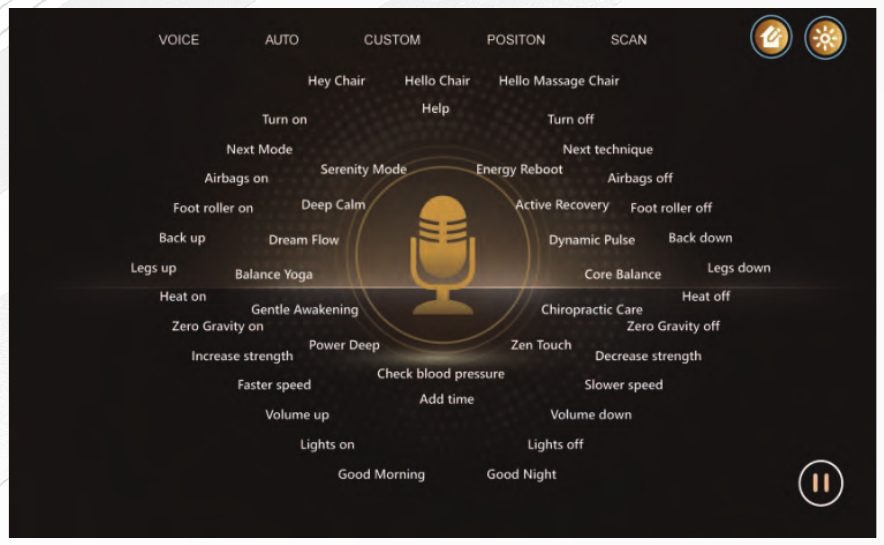
Your massage chair is equipped with an integrated voice assistant for hands-free operation.
Activating Voice Control
Activate the voice assistant by saying one of the following phrases: “Hey Chair”, “Hello Chair”, “Hello Massage Chair”.
| Voice command | Response |
|---|---|
| Turn on / Turn off | OK, power on / OK, shutting down |
| Next mode / Next technique | OK, switching mode / OK, switching technique |
| Serenity Mode · Deep Calm · Dream Flow · Balance Yoga | Starting that mode |
| Gentle Awakening · Power Deep · Energy Reboot · Active Recovery | Starting that mode |
| Dynamic Pulse · Core Balance · Chiropractic Care · Zen Touch | Starting that mode |
| Airbags on / off | OK, airbags on / off |
| Foot roller on / off | OK, foot roller on / off |
| Back up / Back down | OK, raising / lowering backrest |
| Legs up / Legs down | OK, raising / lowering calf |
| Heat on / Heat off | OK, heating on / off |
| Zero Gravity on / off | OK, Zero Gravity on / off |
| Increase strength / Decrease strength | OK, stronger / softer massage |
| Faster speed / Slower speed | OK, rollers faster / slower |
| Add time | OK, extended 10 minutes |
| Volume up / Volume down | OK, volume up / down |
| Check blood pressure | Measuring blood pressure |
| Lights on / Lights off | Lights on / Lights off |
| Help | Lists available commands and switches the tablet to the voice-control page |
| Good Morning / Good Night | Plays a morning or evening greeting |
4.7 Settings Menu
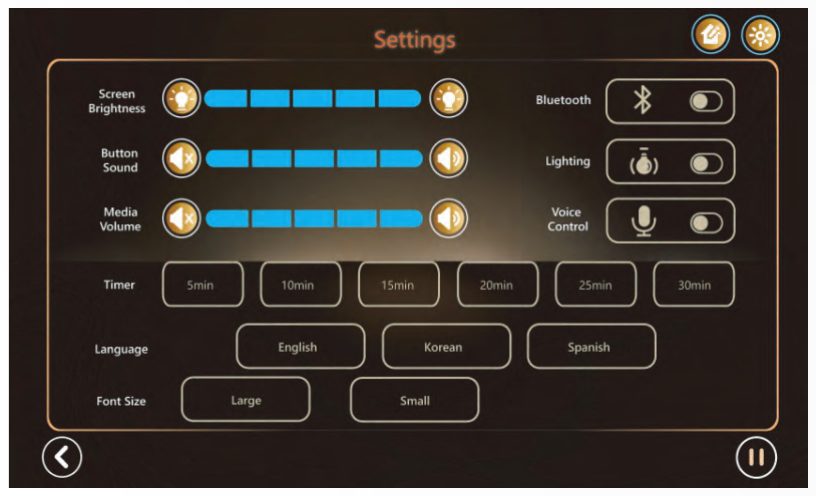
Display & Sound
Screen brightness, button sound volume and Bluetooth® media volume.
Connectivity & Atmosphere
Bluetooth® connection, ambient lighting, and voice control on/off.
Session & Language
Set the timer in five-minute increments from 5 to 30 minutes; choose English, Korean or Spanish for the interface.
4.8 Shortcut Instructions
The shortcut control panel, located on the side of the chair, provides quick and convenient access to frequently used functions.
| Button | Function |
|---|---|
| Power | Press to turn the chair on or off. Rotate the control to adjust massage speed. |
| Auto | Cycle through the available automatic massage programs. |
| Heating | Activate or deactivate heat therapy for the waist and leg areas. |
| Airbag | Activate sequential inflation and deflation for shoulders, arms, legs and feet. |
| Roller | Turn the foot roller massage on or off. |
| Backrest Up | Press and hold to raise the backrest to an upright position. |
| Backrest Down | Press and hold to recline the backrest. |
Additional Controls
- Pause / Resume — press to pause an active session; press again to resume.
- Gentle Awakening (Stretching) — starts a full-body stretching program.
- More Modes — access additional massage programs.
- Preferences — massage timer, screen brightness, button and media volume, Bluetooth®, ambient lighting, language and voice control.
05Technical Specifications
| Specification | Details |
|---|---|
| Product Name | MALANG Massage Chair — Muse (Radiant White) / Legend (Timeless Black) |
| Model Number | ML-FV8-25V1 (shared by both finishes) |
| Product Type | Dual Roller SL-Track Massage Chair |
| Rated Voltage | AC 110V |
| Frequency | 60 Hz |
| Rated Power | 150 W |
| Backrest Recline | 115° – 155° |
| Heat Range | 35 °C – 45 °C |
| Session Duration | 5 – 30 minutes, in 5-minute increments |
| Airbags | Approximately 20 |
| Massage Heads | 8 (dual mechanism) |
| Interface Languages | English · Korean · Spanish |
06Maintenance
Cleaning
Wipe with a soft, dry cloth. If necessary use a mild, neutral detergent. Avoid corrosive, abrasive or solvent-based cleaners, as they may damage the surface.
Power Cord
If the power cord becomes damaged, discontinue use immediately and contact an authorized service provider for replacement.
Electrical Safety
Unplug the chair when not in use and before cleaning or servicing.
Protection
Do not place sharp or heavy objects on the chair, as this may cause permanent damage.
Storage
Store in a dry, well-ventilated environment. Excessive humidity may damage internal components.
07Safety Precautions
Please read and follow the instructions below to ensure safe operation and long-term performance.
Handling
Avoid applying excessive force or pressure to any part of the chair during use or relocation.
Power Supply
Use only an AC 110V power source.
Unplugging
Always unplug the chair when not in use, before cleaning, or before installing or removing components.
Overheating Prevention
Do not place cushions, blankets or coverings on the chair during operation, as this may restrict ventilation and cause overheating.
Heat Exposure
Keep the power cord away from heating surfaces.
Air Ventilation
Ensure that air outlets remain unobstructed and free from dust, hair or debris.
Foreign Objects
Do not insert any objects into the openings of the chair.
Location
Use indoors only. Do not operate outdoors or where aerosol products or oxygen are in use.
Power-Off Procedure
After turning off all operating controls, unplug the power cord from the wall outlet.
Coverings
Do not cover the massage chair during use or operation.
Environment
Operate in a clean, dry, well-ventilated space. Avoid excessive humidity, dust, direct sunlight or proximity to heat sources.
08Safety Protections
Supervision
When used by children, elderly individuals, or persons with physical or cognitive limitations, close adult supervision is required.
Authorized Parts
Use only replacement parts and accessories approved by the manufacturer.
Damage or Malfunction
Do not operate the chair if the power cord or plug is damaged, if the chair has been dropped, exposed to water, or is not functioning properly. Contact an authorized service center.
Moving the Chair
Do not drag the chair by the power cord or use the cord as a handle.
09Important Tips
Jewelry and Clothing
Remove rings, bracelets, necklaces and pins before use. Avoid loose or restrictive clothing that may become caught during operation.
Initial Use
During first use, only the power function is available. Additional functions activate once the chair has fully powered on.
Children and Supervision
Children should use the chair only under adult supervision. Do not allow children to climb, play or stand on the chair.
Massage Intensity
Begin at a low intensity and increase gradually. Pressure should feel relaxing and supportive, never painful.
Health Considerations
Consult a qualified medical professional before use if you have a medical condition. Do not use the chair if you have open wounds, skin conditions, heart disease, high blood pressure or other serious health concerns without medical guidance.
Electrical Safety
Do not use the chair together with other therapeutic electrical devices such as electric blankets. Avoid use within one hour after a full meal.
Pinch Points
Keep hands and body parts away from moving components and areas where compression or pinching may occur.
Flammable Materials
Keep all flammable or combustible materials away from the chair at all times.
Intended Use
This massage chair is designed for personal, in-home use only. It is not intended for commercial, rental or medical applications.
Temperature
If the chair has been stored in a low-temperature environment, allow it to reach room temperature for at least one hour before use.
Massage Duration
The recommended maximum session time is 20 minutes. For safety, the chair automatically stops after extended continuous use.
Heat Function
Use the heat function with caution, especially if you are sensitive to warmth.
Sensitive Areas
Do not apply massage to sensitive areas such as elbows, knees, chest or abdomen. If discomfort occurs, stop use immediately and consult a medical professional.
Power Interruptions
In the event of a power outage, exit the chair carefully. Manual repositioning may be required.
10Product Warranty
To protect consumer interests, this product is covered by a two-year limited warranty, in accordance with applicable national regulations.
10.1 Complimentary Warranty Service
If a product malfunction occurs due to a manufacturing or material defect within the two-year warranty period, necessary replacement parts will be provided at no charge.
10.2 Warranty Exclusions (Chargeable Service)
The warranty does not cover damage or malfunction resulting from the following conditions. In such cases, service and replacement parts may be provided at the customer’s expense:
- Improper use, misuse, or unauthorized self-repair
- Use of a power supply that does not meet specified voltage requirements
- Damage caused by unauthorized relocation, transportation, modification, or installation
- Damage resulting from normal wear, contamination, or lack of routine care
- Damage caused by natural disasters, environmental events, or pest infestation
10.3 Out-of-Warranty Service
Repair services will be provided at full cost under the following circumstances:
- The warranty period has expired
- A valid warranty card cannot be presented or registered
11After-Sales Service & Warranty Registration
Register your warranty online using the form below. Once registered, your eligibility for complimentary service is on file — no paper card to keep.
The Request Service button opens a mail draft to support@malangmassagechair.com — replace it with your live support address.
Service Record
Repair history is recorded as follows and is reviewed with you by customer support when service is requested.
| Date | Repair Details | Replacement Parts | Qty | Technician | Customer Signature |
|---|---|---|---|---|---|
12Troubleshooting Guide
What is happening?
Pick the symptom that matches and the matching steps appear immediately.
The full troubleshooting list is below. Tap an item to expand it.
I hear sounds during operation (normal)
Possible causes
- Sound from the massage mechanism during operation
- Airbags inflating and deflating
- Solenoid valve activation
- Air pump operation
Solution
These sounds are a normal part of operation and do not indicate a malfunction. No action is required.
The chair does not operate
| Possible cause | Solution |
|---|---|
| The power plug is not fully inserted | Ensure the power plug is securely connected to both the wall outlet and the chair |
| The main power switch is turned off | Confirm that the main power switch is turned on |
| The power button has not been activated | Press the power button on the remote control or shortcut panel |
The massage stops during use
Possible causes
- The 20-minute session limit has been reached and the chair has entered standby mode
- The motor has overheated and activated protective shutdown
Solution
- Press the power button to restart the massage session
- Turn off the chair and allow the motor to cool before resuming use
Voice commands are not responding
- The assistant enters standby after 10 seconds with no command — say “Hey Chair” again to reactivate.
- Check that Voice Control is enabled in the Settings menu.
- High ambient noise can reduce recognition accuracy.
The heat function does not feel warm
- Heat operates in the 35–45 °C range and takes a few minutes to reach temperature.
- Heating applies to the waist and leg areas only.
- Confirm heating is switched on in Settings or on the shortcut panel.
Bluetooth® audio will not connect
- Confirm Bluetooth® is enabled in the Settings menu.
- Remove the existing pairing on your phone, then pair again.
- Check that Media Volume is not set to zero.
Health Scan does not display a result
- Your fingertip must be in full contact with the glass sensor.
- Remain still throughout the measurement.
- This feature is for reference only and is not a medical diagnostic tool.
- The manufacturer reserves the right to improve the product and this manual without prior notice.
- Product appearance may vary slightly from the images shown in this manual.
- While this manual has been carefully reviewed, minor printing or interpretation errors may occur.
- Please dispose of this product in accordance with local environmental regulations.